Pin your Claude Code, Codex, Antigravity, Grok & Muse
quota to the menu bar.
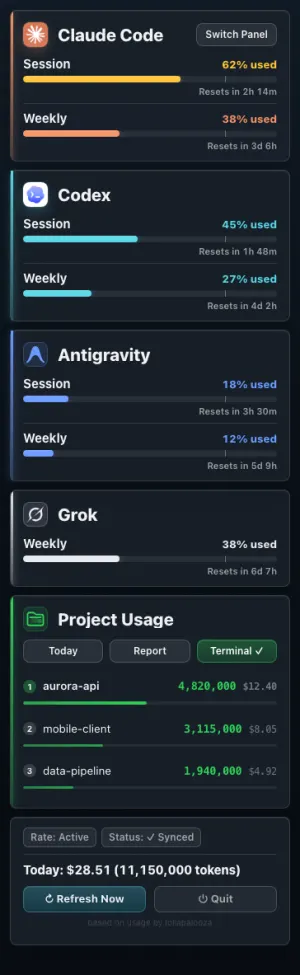
A tiny menu bar app for macOS (and system tray app for Windows) that shows how much of your AI quota you’ve used and when it resets, so you see the wall before you hit it.
Windows app, or terminal-only uvx usage-cli → all install options
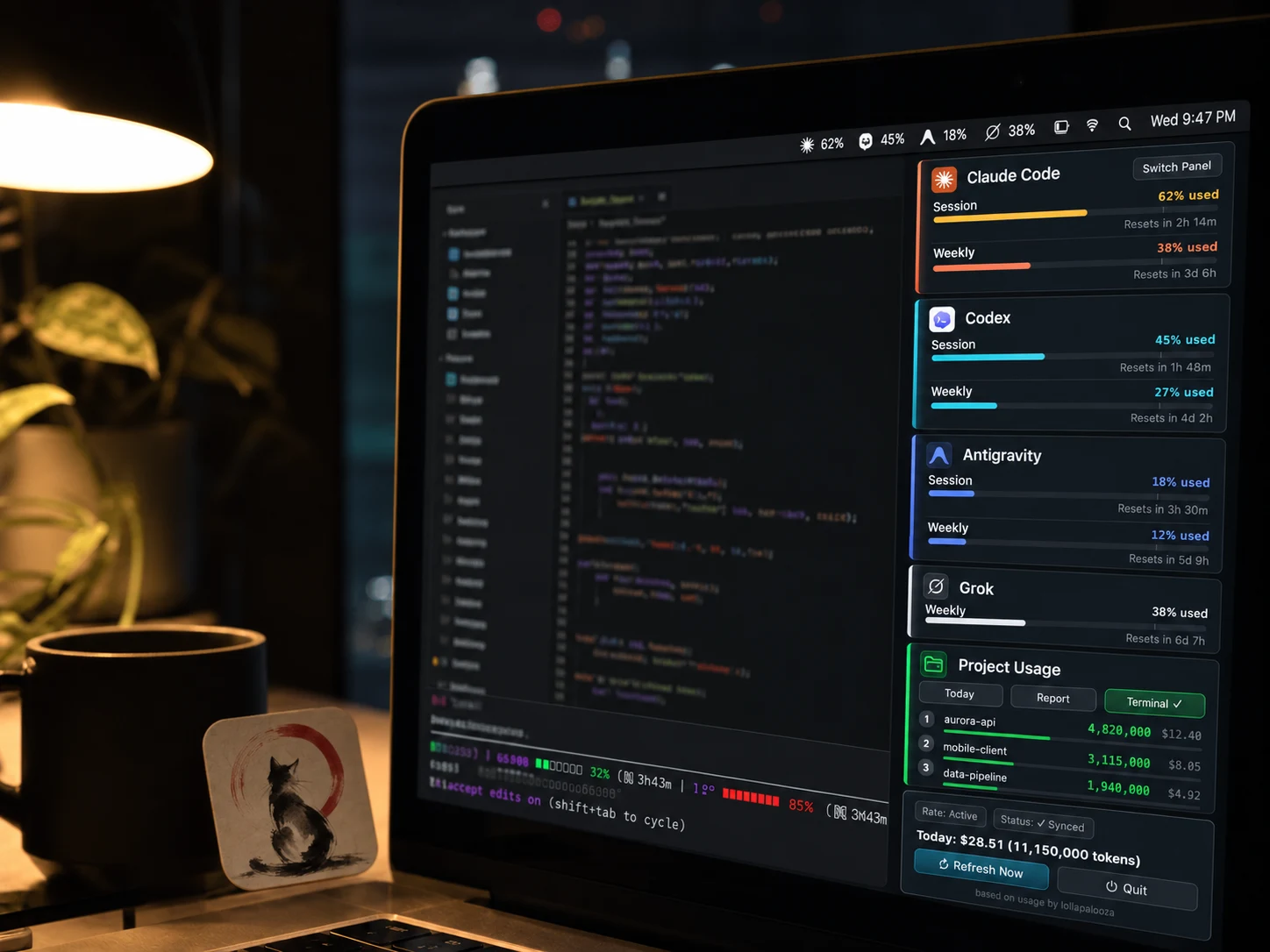
Built for developers who burn tokens.
Stop guessing if you’re about to hit the rate limit mid-refactor.
5-hour & 7-day quota at a glance
The macOS menu bar shows at most three tools with the highest Session usage, in Claude → Codex → Antigravity → Grok → Muse order; open the panel to see all tools and project costs.
Claude Code, Codex, Antigravity, Grok & Muse, one app
Track Anthropic, OpenAI, Google, xAI, and Meta quota side by side. Codex is auto-detected from ~/.codex/sessions/ with no setup; Antigravity uses the sign-in its own CLI already stores. Grok and Muse tokens count toward today’s cost and project totals, just like Claude Code and Codex.
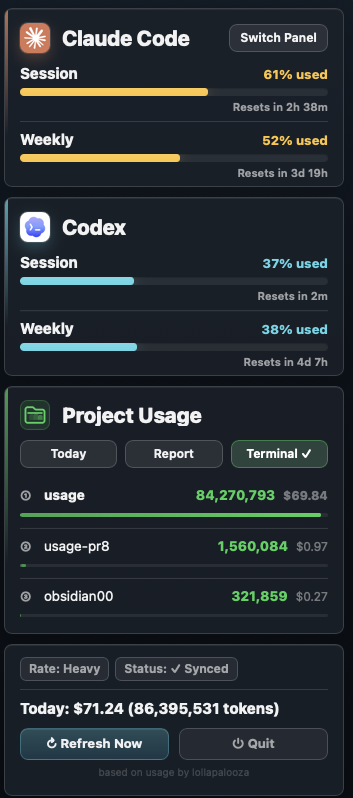
Menu bar & panel
More than a percentage
Antigravity’s three quota pools
The card shows the Gemini pool by default. Tap the Gemini ⇄ tag to cycle through the separate Claude / GPT and Gemini 4 Argon pools; the choice is remembered. Argon has a weekly limit only.
Outage alerts
An orange-red banner appears when Claude Code, Claude API, or Codex API is down or degraded, read from their public status pages. Antigravity has no public status page, so it isn’t covered.
Quota notifications at thresholds you pick
Opt in to system notifications when a quota runs low, runs out, or recovers, and pick the alert thresholds from the menu. Once a quota is used up, the menu bar and status line count down to its recovery instead.
Hide what you don’t use
Hide the Claude Code, Codex, Grok CLI, Antigravity, or Muse Code section from the menu bar and panels in one click.
Your layout
Drag the panel anywhere and drag quota cards to reorder them; the order survives restarts. The UI follows your system language: Traditional Chinese, Simplified Chinese, English, Japanese, or Korean. With four or more quota cards visible, all cards switch to a compact layout.
On the Windows taskbar, too
On Windows, usage lives in the system tray. Turn on Show Taskbar Quota to keep a quota label on the taskbar; when a quota is used up it counts down to recovery, and a right-click opens the tray menu.
Status line: a heads-up before you hit the wall
At 70% context, the status line nudges you to /clear or /compact. The number turns yellow at 50% and red at 80%, and a missed prompt cache tells you why.

Helpers that run inside Claude Code.
All off by default. Turn each one on from the menu; every card says whether it uses extra quota.
Token Saver
Claude Code and Codex answer shorter and plainer, while code, commands and error messages stay byte-exact. In an A/B test on real sessions, late replies stayed about 40% shorter instead of drifting 84% longer. In Codex, trust the hook in /hooks first.
Beginner Mode
After each answer, up to three terms show up above the input box with a one-line plain explanation. Terms you mark as understood come back later as a short quiz.
Quota-Aware Mode
When quota runs low, Claude tells you what’s left and when it resets before starting anything big, so you can do a smaller piece or wait. Each conversation also starts with a short quota overview, and Claude hears once about a quota reset, a /login account switch, a Claude or Codex service incident or recovery, and models from the last seven days. Covers Claude Code, Codex, Antigravity and Muse, with no extra model calls.
Auto-start 5-hour timer
Right after a 5-hour quota resets, usage sends each tool one tiny message so the next window starts counting right away. Claude gets Haiku, Antigravity gets Gemini 3.8 Flash Low, and Codex gets its cheapest model.
Now your CLI picks up where you left off
The web and desktop apps keep your history automatically: close them, reopen, it’s all there. The CLI keeps it too, but you need to know the command to pull it back up. Resume makes that automatic: open a new session and it picks up where you left off, no command to remember, no re-explaining. It now also runs a daily health check on your logs. When it spots token waste, the handoff adds a one-line heads-up; type “show me” in Claude Code for the findings and fixes. Reads local files.

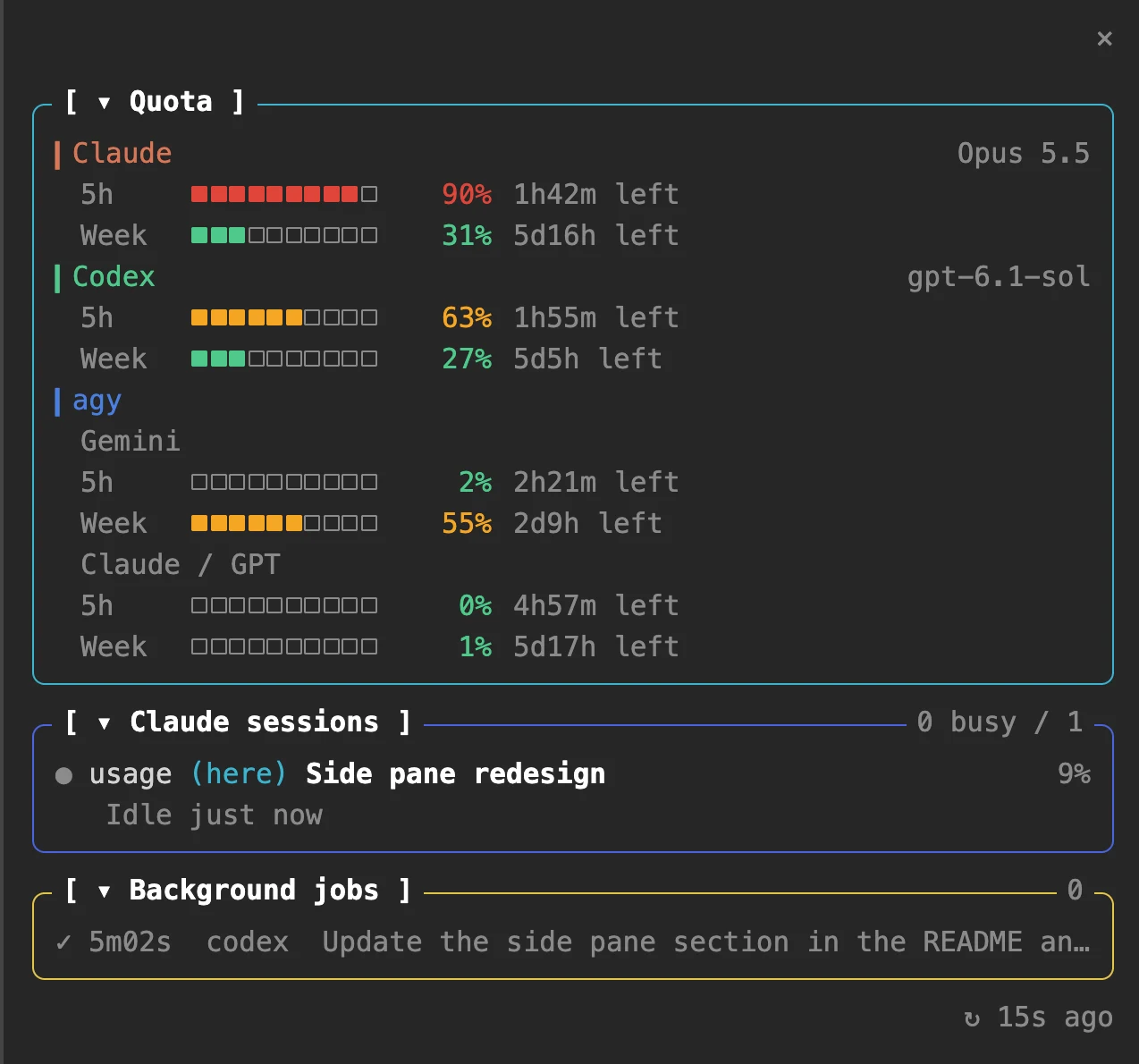
Your quota, right inside Claude Code
On macOS and Windows, see your quotas, conversations, and background jobs—including subagents started with the Agent tool and their status—inside Claude Code. Conversations waiting for your permission or MCP input are marked in yellow. After enabling the pane, it opens on the right automatically at terminal widths ≥144 columns; otherwise, enter /usage-dash. A notification appears when another Claude conversation finishes or starts waiting for you.
Reports, scripts, and a daily digest.
The same numbers, outside the menu bar.
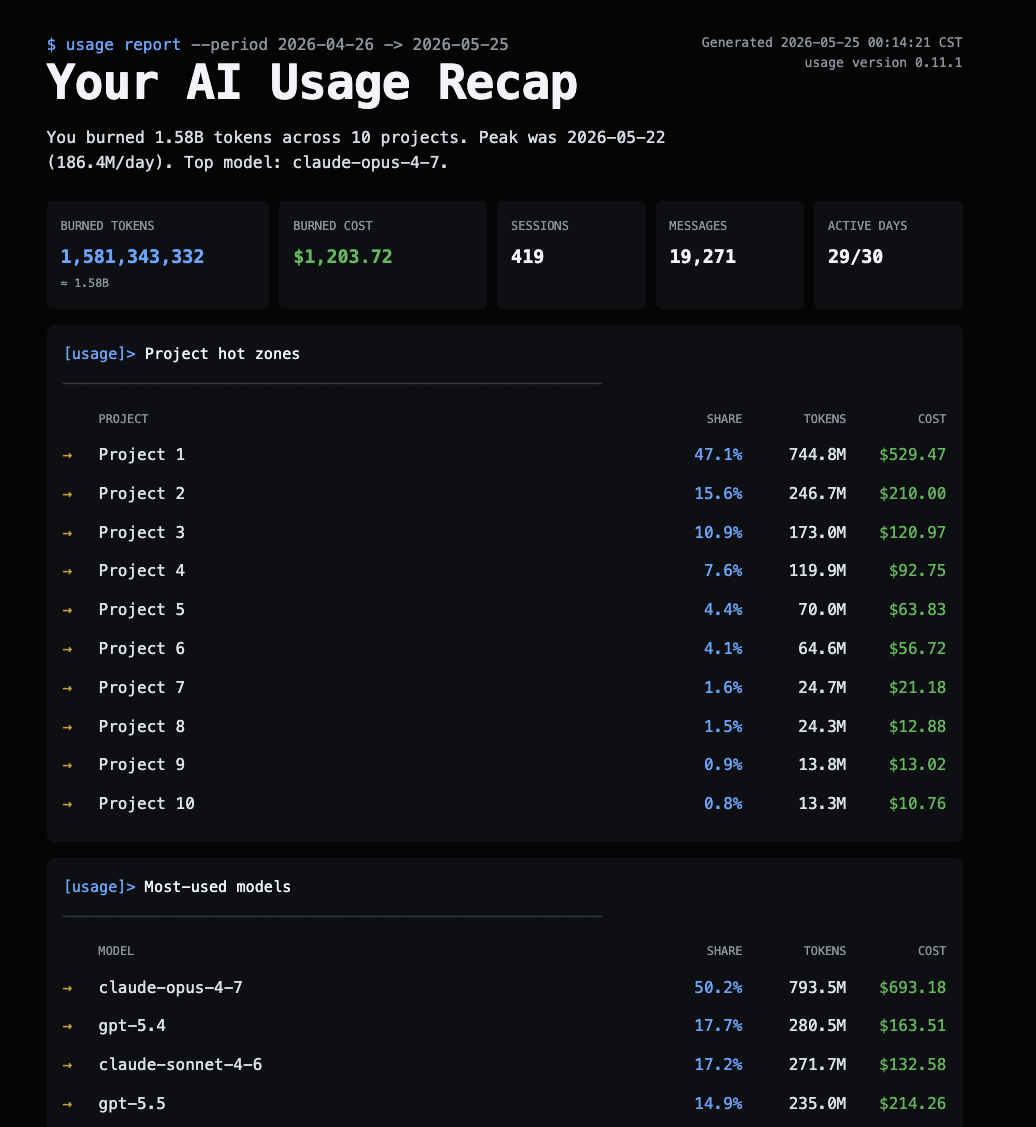
One-click HTML reports
Daily and weekly token trends, project rankings, cost, and a Year in Review with a contribution heatmap. Export .html, .csv, or .png fully offline; project-name masking is on by default and can be turned off. If you hand work from Claude Code to Codex or Antigravity, the report shows which conversations used how much of each weekly quota.
In your terminal
usage status --json hands your Claude Code, Codex, Antigravity, Grok, and Muse quota to Starship, tmux, or your own scripts. Want no menu bar at all? uvx usage-cli runs the terminal interface, on Linux too.
AI Update Daily
A daily public page of changes to Claude Code, Codex, Antigravity, Grok Build, Muse Code, GitHub CLI, and usage itself, with plain-language summaries in five languages.
Open AI Update Daily →Pick a panel that fits your mood.
18 built-in themes. Switch anytime from ⚙ Settings → Switch Panel.
Where the numbers come from.
Read from files on your machine wherever a tool keeps them. Each row says when usage goes online.
- Claude Code
- Quota comes from Claude Code’s status line; tokens and cost from local logs. Without the CLI, an open Claude Desktop is enough: usage reads its local plan-usage history, with no cookies, login tokens, or API calls.
- Local files
- Codex
- Auto-detected from
~/.codex/sessions/and Codex’s own local databases, opened read-only. No setup. - Local files
- Grok CLI
- The weekly percentage is worked out from Grok CLI’s local debug log.
- Local files
- Antigravity
- Asks its own CLI first (
agy -p /usage, no model call). If that fails, it fetches quota from Google’s official endpoint with the sign-in the CLI already stored; usage never writes that credential back. - Goes online
- Muse Code
- Runs
muse usage --json(Muse 1.4.13+, no model call). When that has no reading, it falls back to a small model call throughmuse execin an empty folder, which uses a little Muse quota. - Goes online
- Everything else
- Public Claude and Codex status pages for outage alerts, a public model-pricing table to estimate cost (built-in prices work offline), and an occasional GitHub check for a new version. Beginner Mode, only if you turn it on, sends Claude Code’s latest answer to Claude Haiku through your own Claude Code sign-in.
- Goes online
No telemetry, no accounts, no uploads. SECURITY.md →
Install in 10 seconds.
4 ways to get it running. All free, all AGPL-3.0.
Homebrew
One command. brew upgrade --cask usage keeps it current.
brew install --cask aqua5230/usage/usageDownload .app
Latest usage.app.zip from GitHub Releases. Unzip, then drag to /Applications.
System tray
Latest usage-windows.zip from GitHub Releases. Unzip and run usage.exe. You can also show a quota label in the taskbar; right-click it to open the tray menu.
uvx (no install)
Terminal interface only, with no menu bar or tray. Works on Linux too; uv brings its own Python.
uvx usage-cliNext step: Claude Code users: after installation, click Set Up Status Line in the app popover and restart Claude Code to show quota.
macOS blocked the first launch? Open System Settings → Privacy & Security, scroll down, and click Open Anyway. On macOS 14 or earlier, right-click usage.app → Open instead. Windows showed “Windows protected your PC”? Click More info → Run anyway.